Balance App Review: Features, Pricing, and Who It's For
In-depth balance app review covering features, pricing, AI personalization, privacy, real user ratings, and how it compares to perimenopause apps like Lila.
You're awake at 2 a.m., scrolling through app-store reviews while anxiety, racing thoughts, or another night of broken sleep keeps you alert. If perimenopause is involved, you may also be wondering whether the problem is stress, hormonal change, or both. That's exactly where the Balance app looks appealing, but also where many reviews become misleading.
Balance is a meditation and sleep app, not a menopause platform. This balance app review assesses its onboarding, personalization, meditation library, sleep tools, pricing clarity, privacy posture, and user sentiment. It also asks the question most isolated reviews avoid: what happens when a woman downloads a meditation app hoping it will explain symptoms the app was never designed to track?
The short verdict is straightforward. Balance is a polished choice for guided meditation, focus support, and sleep audio. It isn't a substitute for symptom tracking, hormone-aware guidance, or clinical decision support. If your main goal is meditation, Balance deserves consideration. If your main goal is understanding hot flashes, cycle changes, mood disruption, or treatment options, you'll need a more specialized tool alongside it.
Table of Contents
- What This Balance App Review Actually Covers
- What Balance Is and How the Core Experience Works
- Onboarding, Daily Sessions, and Sleep Features in Practice
- How Balance Uses AI to Personalize Your Practice
- Pricing, Free Trial, and Privacy Considerations
- Comparing Balance With Perimenopause Apps Like Lila
- Who Should Download Balance and Who Should Look Elsewhere
What This Balance App Review Actually Covers
A useful app review should distinguish between what a product promises and what it helps you do. Balance makes sense when you want a structured mindfulness habit, but it can create the wrong expectations if you're searching for a health dashboard.
The questions that matter
This review looks at six practical areas:
- Onboarding depth: Does the initial assessment gather enough information to create a useful starting plan?
- Personalization quality: Do recommendations respond meaningfully to your goals, mood, skill level, and engagement?
- Session library: Are the meditation, focus, and sleep options varied enough to support repeated use?
- Pricing transparency: Can you understand what's free, what requires a subscription, and how the trial converts?
- Privacy posture: Does the app explain how mood, check-in, and account data are handled?
- Real user sentiment: Do public ratings and review volume suggest a mature product with sustained adoption?
Balance has strong scale signals. The U.S. App Store lists 4.9 stars from 121K ratings, while Google Play lists 4.6 stars from 48.6K reviews (App Store review listing). Those figures don't prove that every user benefits, but they do show that Balance has moved beyond an early experiment and built a substantial audience across both major mobile ecosystems.
Independent coverage also highlights a one-year free trial, guided meditations, sleep content, journaling, personalized onboarding, and a minimalist interface. That combination explains the app's appeal. Balance reduces the number of decisions a beginner has to make, then turns meditation into a daily recommendation rather than an enormous content catalogue.
Practical rule: Judge Balance by whether it helps you practise consistently, not by whether it can answer medical questions it was never built to handle.
What this review doesn't claim
Balance isn't being assessed here as a diagnostic tool. It doesn't provide hormone testing, diagnose perimenopause, determine whether hormone therapy is appropriate, or deliver symptom-specific treatment protocols. Meditation may support relaxation and bedtime routines, but an app session can't explain why your sleep changed or tell you whether a symptom warrants medical care.
That distinction matters because many women arrive at a meditation app with a broader problem. They want relief from insomnia, irritability, mental fatigue, or nighttime anxiety, but they also want to identify patterns. Balance can address part of that experience. It leaves the physiological tracking question open.
What Balance Is and How the Core Experience Works
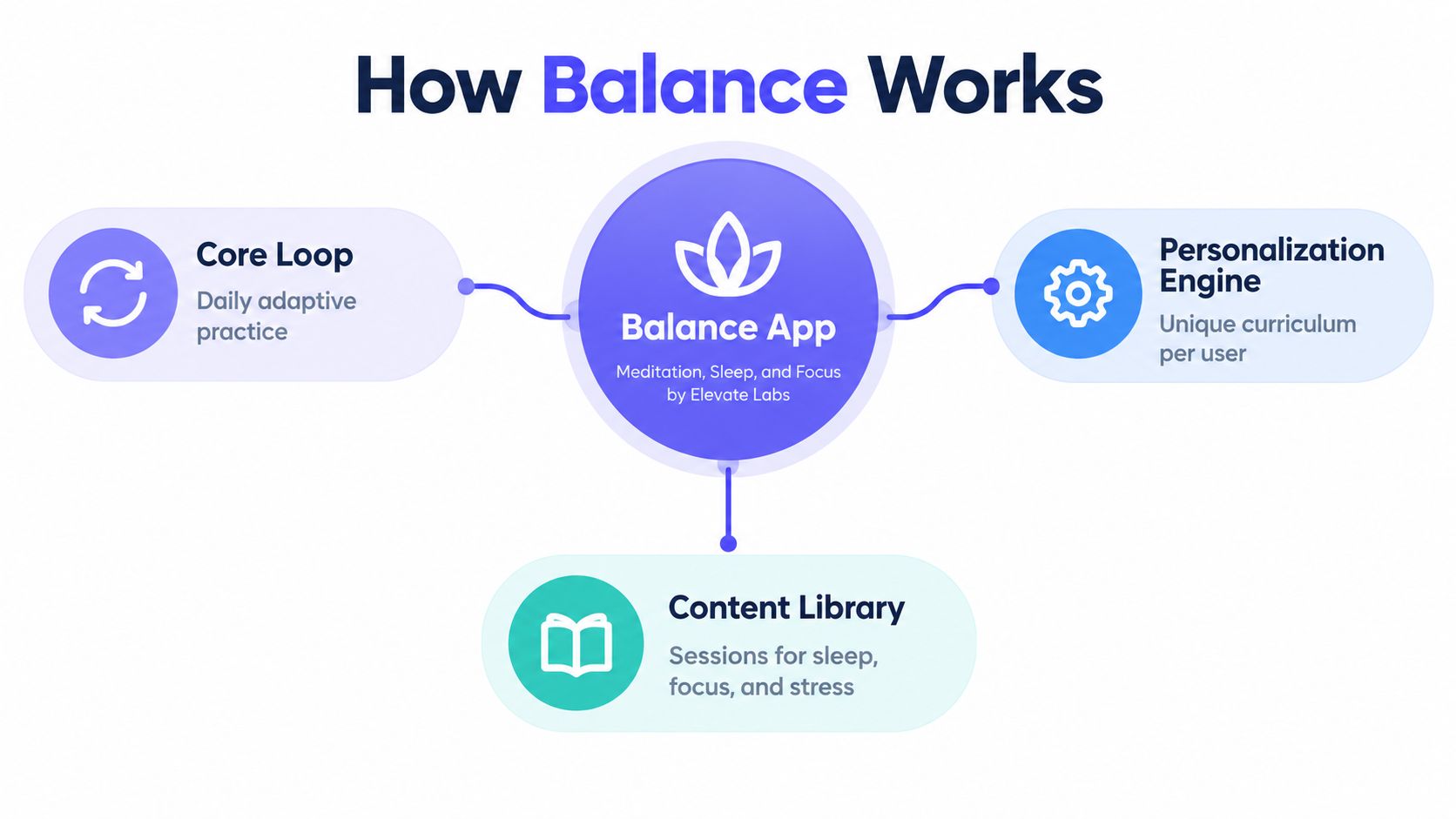
Balance is a meditation, sleep, and focus app developed by Elevate Labs. Its defining feature isn't an enormous catalogue. It's the attempt to turn a short assessment into a guided curriculum that changes as you use the app.
The daily loop
The core experience follows a simple sequence:
- You describe your goals and experience. The app uses your answers to establish a starting point.
- Balance recommends a daily practice. Sessions generally combine guided meditation with breathing, focus work, or relaxation.
- You complete the exercise and check in. Your feedback helps shape what appears next.
- The home screen becomes your launch point. Instead of searching through every category, you see a suggested next step.
That structure is especially useful for beginners who freeze when presented with hundreds of choices. Balance's coach-style guidance gives the product a sense of direction without requiring you to understand meditation terminology first.
The content rests on three connected pillars:
- Meditation: Guided exercises for stress, emotional regulation, attention, and foundational mindfulness.
- Sleep: Sleepcasts, wind-down audio, calming soundscapes, and bedtime-focused practices.
- Focus and movement: Breathing, attention exercises, and body-based practices that help break up sedentary or mentally overloaded days.
The audio is one of Balance's strongest assets. Narrators sound clear and professionally recorded, and the session catalogue covers short practices as well as longer bedtime audio. That production quality makes a difference when you're listening in the dark, using headphones, or trying to follow instructions while tired.
The boundary that matters
Balance isn't a period tracker, hormone tracker, or menopause symptom journal. It doesn't ask you to record cycle phase, hot flashes, night sweats, breast tenderness, vaginal symptoms, or mood patterns linked to hormonal changes. It also doesn't build a longitudinal picture of whether symptoms are improving, worsening, or clustering around a particular phase.
That limitation doesn't make Balance a poor meditation app. It defines the product correctly. You're buying structured mindfulness and sleep support, not a women's health record.
The distinction becomes important when comparing Balance with dedicated perimenopause tools. A meditation recommendation can help you settle before bed. It can't tell you whether repeated night waking is connected to temperature changes, anxiety, cycle disruption, medication, or another health issue.
Onboarding, Daily Sessions, and Sleep Features in Practice
Balance's onboarding is designed to remove the blank-page problem. Instead of opening a library and asking you to choose between unfamiliar techniques, the app starts by asking what you want to improve and how much experience you have.
What happens after installation
The first-time flow typically moves through three stages:
- Goal and mood assessment: You identify priorities such as stress, sleep, mood, or focus.
- Skill calibration: The app establishes whether you're new to meditation or already familiar with guided practice.
- Plan generation: Balance creates a recommended path and places the next session on the home screen.
That sequence feels approachable because the app doesn't demand a major commitment at the start. A beginner can start with a short practice, learn the basic mechanics, and increase the duration when the routine feels manageable.
A typical daily session lasts around 10 to 20 minutes, depending on the recommendation and your selected preference. The coach may suggest meditation first, followed by optional breathwork or a focus exercise. A brief reflection prompt gives you a place to record how the practice felt, although the journaling system is intentionally lightweight.

Sleep is where Balance feels most useful
The sleep tools are more developed than a basic “play relaxing sounds” feature. Sleepcasts provide longer narrated audio stories, generally ranging from 30 to 60 minutes, while sleep music supports users who prefer a less verbal experience. A sleep timer and nature sounds give you more control over how the audio ends.
The library is varied enough to prevent bedtime from feeling identical every night. Narration, ambient sound, and guided relaxation serve different preferences, which is important because some people fall asleep faster with a story while others find spoken audio distracting.
You can also download content for offline use, a practical feature for travel, low-connectivity bedrooms, or anyone who doesn't want streaming interruptions.
The tradeoffs are clear:
- Repetitive check-ins: The daily prompt can feel formulaic once the initial novelty fades.
- Thin journaling: Short text fields are useful for a quick note, but they don't produce meaningful trend visualizations.
- Coach nudges: The warm tone works for beginners, yet some prompts can feel like they're steering you toward an upgrade.
- No physiological context: Balance can record how you felt during a practice, but it won't connect that feeling to night sweats, cycle timing, or hormonal symptoms.
For a broader sleep-tracking workflow, a dedicated tool such as an iPhone sleep monitor app is better suited to users who want to examine sleep patterns beyond meditation sessions.
Balance's session variety can compete well with larger mindfulness brands in selected categories, while its studio-quality audio and reliable downloads make daily use pleasant. The weakness is not the experience itself. It's the absence of a symptom layer for users whose sleep problems have a physiological component.
How Balance Uses AI to Personalize Your Practice
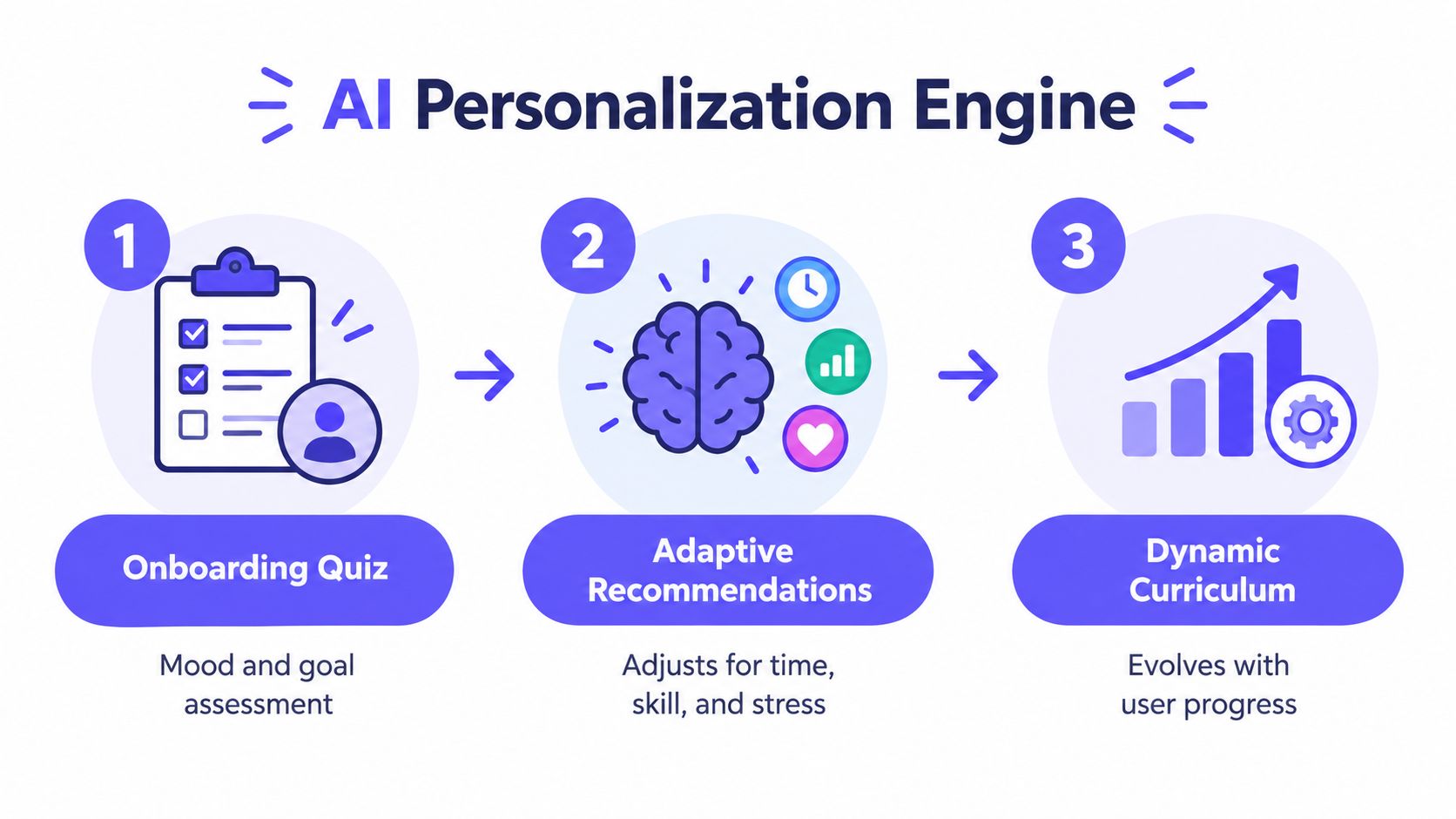
Balance uses personalization to answer a practical question: what should you do today? The app starts with goal and mood questions, then uses your stated skill level, available time, reported stress, and engagement to shape recommendations.
Reactive adaptation versus real understanding
Not every adaptive feature requires advanced artificial intelligence. Some personalisation is likely to rely on straightforward rules:
- Match shorter sessions to limited available time.
- Tag content by goal, such as sleep or focus.
- Adjust difficulty as you complete foundational practices.
- Use check-in responses to alter the next recommendation.
A more advanced recommendation layer can sequence meditations, sleepcasts, and coach programmes according to engagement patterns. If you repeatedly skip longer practices, the app may surface shorter options. If you use sleep content consistently, bedtime audio can become more prominent on the home screen.
That responsiveness is useful because it lowers friction. You don't have to search for a suitable session each evening, and the app can meet you closer to your current capacity rather than insisting on a fixed routine.
Personalization works best when it reduces effort without pretending to understand more than the data supports.
Where the system stops
Balance's intelligence remains focused on meditation behaviour. It can respond to a stated goal or a skipped session, but it doesn't understand hormonal transitions in the way a perimenopause-specific application is designed to do. It doesn't adapt recommendations around cycle phase, hot flashes, night sweats, brain fog, or recurring mood changes.
That difference separates content personalization from health-context personalization. Balance can infer that you may prefer a shorter sleep session. It can't establish whether your sleep disruption is part of a recurring symptom pattern or whether that pattern should be discussed with a clinician.
A dedicated women's health tool such as an AI coach for perimenopause support addresses a different job. It uses symptom and lifestyle information to guide actions around issues such as sleep, mood, energy, and hot flashes. Those products shouldn't be treated as interchangeable with Balance.
My assessment is direct: Balance's personalization feels intelligent enough to keep beginners moving, but it remains mainly reactive. Users who want a smooth meditation routine will benefit. Users who want an evolving picture of hormonal health will find the model too narrow.
Pricing, Free Trial, and Privacy Considerations
Balance's pricing deserves careful attention because trial language can make a meditation app feel free until the subscription converts. The available product information identifies a seven-day free trial, an annual subscription, a monthly alternative, family access, and a lower-tier Meditate option in recent updates. Exact prices can vary by market and storefront, so check the offer displayed on your device before confirming.
What the plans generally cover
| Plan | Price | Free Trial | Key Features Included |
|---|---|---|---|
| Annual subscription | Varies by market and storefront | Seven-day trial may apply | Full meditation, sleepcast, coach, and personalization access |
| Monthly subscription | Varies by market and storefront | Check the checkout screen | Full subscription library with monthly billing |
| Family plan | Varies by market and storefront | Check the checkout screen | Shared access for eligible family members |
| Meditate option | Varies by market and storefront | Check the checkout screen | A narrower meditation-focused selection |
| Free access | No subscription charge | Limited access | Selected content and limited functionality |
The paywall generally matters most for the full sleepcast library, coach programmes, and deeper personalization. Before starting a trial, read the renewal screen, confirm the billing period, and cancel through the relevant app-store settings if you decide not to continue. Don't rely on deleting the app to stop billing.
Privacy is part of the quality test
Mood responses, reflections, and check-in data deserve more scrutiny than ordinary entertainment preferences. An independent umbrella review found that privacy and security appeared as the most frequently cited evaluation criterion in 13 of 15 review articles, or 87%, and identified the Mobile App Rating Scale as the most common quality framework (digital health app review framework).
For Balance, check whether its policy clearly explains:
- How mood and check-in responses are stored.
- Whether data is encrypted during transmission.
- What information is shared with service providers or third parties.
- Whether aggregated data can be used for analytics.
- How account deletion works.
- What happens to backups after deletion.
The absence of in-app ad networks is a positive usability signal, but it doesn't answer every data-governance question. Subscription auto-renewal and limited detail about aggregated data use are the areas I'd scrutinize before entering sensitive reflections.
You can also compare these questions with Lila's privacy information, but don't assume that a health-focused app automatically has stronger privacy practices. Read the policy for the specific product you plan to use.
Comparing Balance With Perimenopause Apps Like Lila
Balance and perimenopause apps address different needs. Comparing them as direct substitutes leads to poor advice, especially for women whose sleep, mood, or physical symptoms demand more than relaxation content.
| Feature | Balance | Lila | Headspace |
|---|---|---|---|
| Guided meditation | Strong | Supportive, alongside health guidance | Strong |
| Sleep audio | Strong | Focused on symptom-aware sleep support | Strong |
| Hot-flash tracking | Not a core feature | Designed for symptom tracking | Not a core feature |
| Cycle and symptom patterns | Not a core feature | Central to the experience | Not a core feature |
| Hormone-aware guidance | Limited | Core focus | Limited |
| Clinician-oriented health context | Not the product's purpose | Health guidance and action planning | Not the product's purpose |
| Healthcare decision support | No | Informational support, not diagnosis | No |
| Best fit | Meditation, relaxation, sleep routines | Perimenopause symptom management and coaching | Broad mindfulness and sleep content |
What Balance does well
Balance wins on accessibility. Its assessment and guided curriculum reduce choice overload, giving new users a clear starting point instead of forcing them to browse a large library.
Its sleep content is another strength. Sleepcasts, music, nature sounds, and a timer support a consistent bedtime ritual. The tone stays approachable, so users do not need prior knowledge of meditation traditions or specialist health language.
For occasional stress or sleep disruption, that may be enough. A calming practice before bed can support a wider routine, even though Balance does not explain the underlying cause of symptoms.
What a menopause tool adds
Perimenopause-specific apps supply the health context Balance leaves open. They can bring together symptoms, mood, sleep, energy, meals, and cycles, then use those records to identify patterns and suggest practical actions. They also help users frame questions for a clinician when symptoms affect work, relationships, exercise, or sleep. The best perimenopause apps overview offers a useful starting point for comparing tools in this category.
Quality still varies across menopause apps. A 2023 systematic review found that only 50% of reviewed menopause apps covered osteoporosis, the average quality score was 3.1 out of 5, and 14 of 28 apps fell below acceptability (systematic review of menopause apps). The same evidence summary reported that only 27.3% of apps in prior research involved medical professionals and only 22.7% used evidence-based information. A polished interface does not prove strong clinical value, and AI features deserve the same scrutiny.
The practical recommendation is to combine tools when needed. Use Balance for meditation or sleep audio, then use a dedicated health app for symptom history, pattern recognition, and action planning. A meditation app can support daily coping, but it should not serve as your medical record.
Who Should Download Balance and Who Should Look Elsewhere
Balance is a clear yes for meditation-curious users who want guided sleep support, anxiety relief, and short daily sessions. The structured onboarding, approachable curriculum, polished audio, sleepcasts, and free-trial option make it easier to establish a routine without browsing endlessly.
It's particularly suitable if you want the app to tell you what to do next. Beginners often need that direction more than they need a massive library. Balance gives you a path, then gradually adjusts the practice around your stated goals and usage.
Choose another style if you already have a practice
Experienced meditators who want mantra work, Zen traditions, contemplative depth, or non-Western frameworks may find Balance too Western and secular. Its strength is accessibility, not spiritual breadth.
You may also dislike the structured progression if you want complete control over technique, teacher, duration, or sequence. In that case, a larger library or a tradition-specific platform will fit better than an adaptive curriculum.
Perimenopause users need a second layer
Women navigating perimenopause or hormonal mood disruption get a conditional recommendation. Balance can help with stress, relaxation, and sleep routines, but it doesn't track cycles, hot flashes, night sweats, or information relevant to a discussion about hormone therapy. A symptom-focused service such as Lila's coaching option is more appropriate when you need health context and practical accountability alongside mindfulness.
The broader concern is that self-tracking alone may not improve treatment choices. The overlooked question is whether an app helps you recognize when to seek care, prepare for a clinical conversation, or address several connected symptoms rather than just logging them.
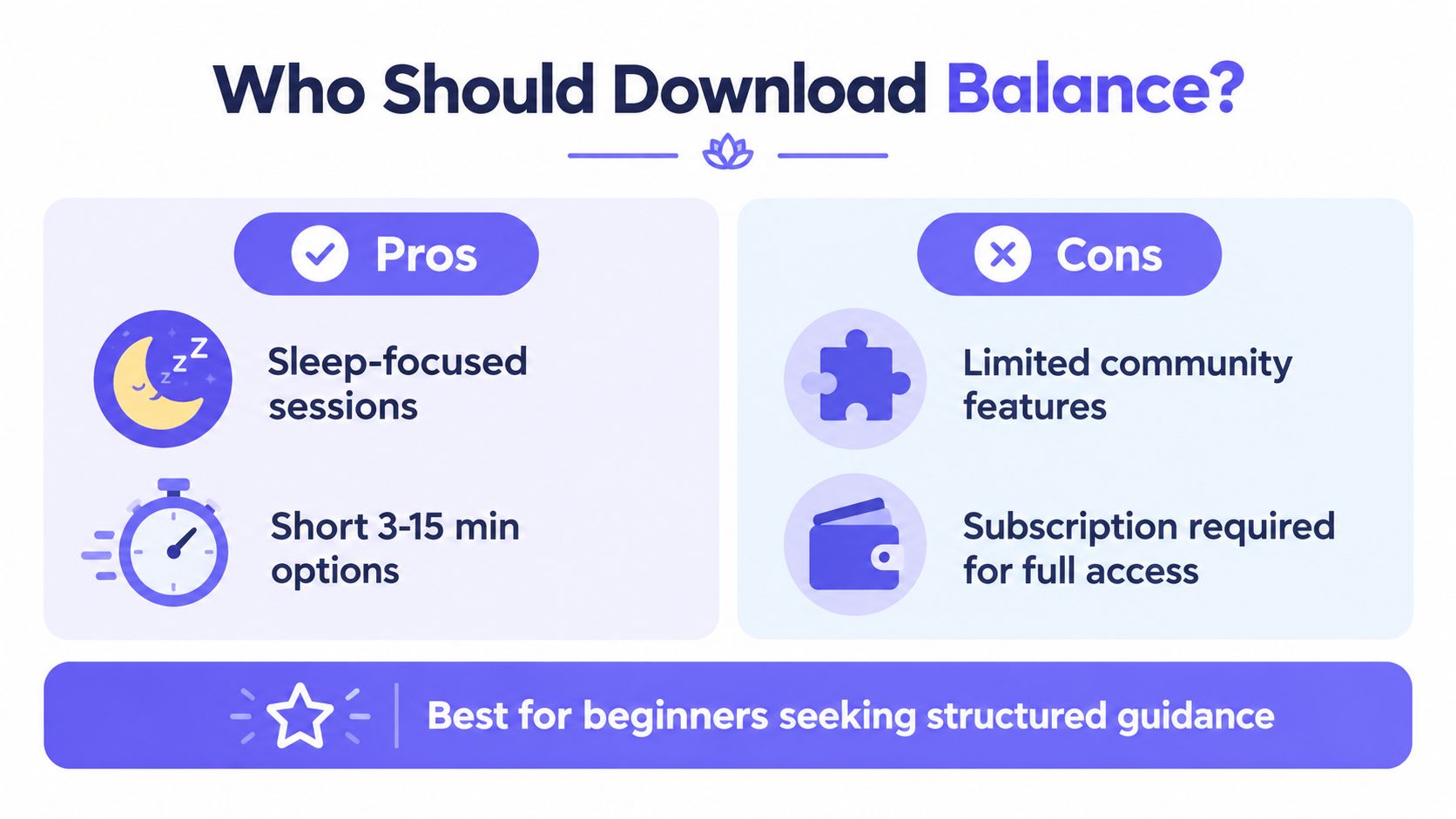
Decision rule: Download Balance if meditation is the goal. Skip it, or supplement it with a symptom-focused tool, if hormonal health tracking is the goal.
Lila combines a daily perimenopause check-in, personalized action plans, symptom and lifestyle tracking, and a chat-based coach for issues such as sleep disruption, hot flashes, mood changes, energy, and weight concerns. If Balance's meditation features appeal to you but its missing symptom context doesn't, visit Lila to explore a more health-focused companion.
Get Lila, your personal coach for perimenopause.
Built for women in their 40s. 24/7 coaching, in your pocket.